
Beats headphones and earbuds
How to Spot Fake Beats: Real vs Fake Checks for Studio Pro, Solo 4 and Earbuds
Real vs fake Beats Studio Pro, Solo 4 and earbuds: 8 checks rated by what each proves, from box contents to the 3 earbud serials. A pop-up is not proof.
Quick answer
No single check proves Beats are real. Start with the strongest: the model, release year and box contents should match what Apple and Beats list, and the serial on the box, the product and your phone's Settings should agree, unless Apple replaced the unit in service. Earbud sets show three serials. Then check controls, weight, print and seller. A pairing pop-up, registration or valid coverage result is never proof.
Beats is an Apple company, but on 3 November 2026 neither Apple nor Beats had a live guide to spotting fakes. Beats' Safe Buying Guide link ended in an error page that day, and most tips online come from models sold between 2014 and 2018, such as the Solo HD, Solo 2 and Solo 3. So this guide uses Apple's and Beats' own specifications for current models. It rates each check by what it can prove and marks old tips as old. If you own an older pair, such as a Studio3 Wireless or Solo3, the serial, packaging and seller checks (2, 6 and 7) still apply.
Which checks actually prove anything?
The table rates the eight checks in this guide by what each can show. A failed strong check is a serious warning. A passed check adds only a little confidence, because good copies pass several checks.
One strong warning outweighs several passes. Passes add up, but they never prove an item is genuine. When checks disagree, stop and get a second opinion before you pay, or before the return window closes.
| Check | What genuine Beats show | What it proves |
|---|---|---|
| 1. Model, year and box | Apple's release year and Beats' box list | A mismatch is a strong warning. A match proves little. |
| 2. Serial numbers | One number on box, product and Settings, unless replaced in service. Earbud sets show three in Settings. | A mismatch is a strong warning. A match is only consistent. |
| 3. Controls and features | Buttons, sliders and charging as Apple and Beats describe | Moderate. Exposes cheap copies. |
| 4. Weight and size | Beats' published figures | Weak alone |
| 5. Pairing, Find My, firmware | Normal Apple setup and updates | Suggestive only. Sources disagree. |
| 6. Packaging and print | Clean print and correct spelling | Weak to moderate. Needs a genuine unit to compare. |
| 7. Seller and price | Apple or a listed retailer | A strong risk signal before you pay |
| 8. Sound and battery | Beats' battery figures | Weak. Batteries wear. |
1. Does the model, year and box match what Apple and Beats list?
Start by naming the exact model. Apple's guide Which Beats do I have? gives a release year for each model: Beats Flex 2020, Beats Fit Pro 2021, Beats Studio Pro 2023, Beats Studio Buds + 2023, Beats Solo 4 2024, Beats Solo Buds 2024, Beats Pill 2024, Powerbeats Fit 2025, Powerbeats Pro 2 2025 and Beats 360 2026. A listing that gives an earlier year for one of these exact models does not match Apple's guide. Older products can share part of a name, so match the exact model name before you judge the year.
Apple's guide also lists box contents for models not in the table. Beats Fit Pro and Powerbeats Fit come with secure-fit wingtips and a charging case. Beats Solo Buds come with silicone ear tips in several sizes and a charging case. The Beats Pill comes with a USB-C cable.
An extra item is the clearest tell in this check. Beats sells the Powerbeats Pro 2 without a cable or a power adapter. A Powerbeats Pro 2 box sold as complete that holds either one does not match Beats' list.
These lists come from Beats' US pages and can vary by region and date. A 2016 answer on Yahoo! Chiebukuro, a Japanese Q&A forum, said Beats then shipped without a warranty card in Japan. So a missing card is a question, not a verdict.
How much it proves: a mismatch is a strong warning. A match proves little, because copies can include the same items. The table below shows what Beats publishes for four current models.
| Model | Released | In the box |
|---|---|---|
| Beats Studio Pro | 2023 | Carrying case, USB-C to USB-C cable, 3.5 mm cable, Quick Start Guide, warranty card. Adapter sold separately. |
| Beats Solo 4 | 2024 | Carrying case, USB-C to USB-C cable, 3.5 mm cable, Quick Start Guide, warranty card. Adapter sold separately. |
| Powerbeats Pro 2 | 2025 | Eartips in five sizes, XS to XL (M fitted), wireless charging case, Quick Start Guide, warranty card. No cable or adapter. |
| Beats Studio Buds + | 2023 | Ear tips XS, S, M and L, charging case, USB-C to USB-C cable, warranty card. Power adapter sold separately. |
2. Do the serial numbers on the box, the product and your phone agree?
Compare the serial in three of the places Apple lists: near the barcode on the original box, printed on the product, and in your phone's Settings. Apple also says it appears on the original receipt or invoice. On an iPhone or iPad, open Settings, tap the Beats name and scroll to About. Earbud sets show three serials there: the case first, then the left and right earbuds when you tap.
All the numbers should agree. A mismatch can be innocent, because a replacement unit from Apple service can have a new serial. Ask the seller for the receipt and the service paperwork. Without them, treat a mismatch as a strong reason not to buy.
A match is not proof. A user on Apple's community forum wrote in May 2025 that counterfeiters copy real serials. The serial number guide shows where each model prints its number, a Studio3 Wireless case where the box and Settings did not match, and what Apple's coverage check can and cannot tell you.
How much it proves: a mismatch is a strong warning. A match is only consistent with genuine Beats.
3. Are the buttons, sliders and charging where Apple and Beats say?
Apple and Beats describe the controls of each model. A feature that contradicts them means the item is not what the listing says.
Headphones. On the Solo 4 and the Studio Pro, Apple says the button on the left earcup plays or pauses. To pair by hand, you hold the power button on the right earcup of a Solo 4, or the system button on the right earcup of a Studio Pro. On the Studio Pro, Beats lists a "b" button for music and calls, a volume up and down rocker, and a multi-function button for listening modes, EQ modes, power and pairing. Beats calls its adjusters premium metal sliders and its cushions UltraPlush, in engineered leather.
On the Solo 4, Beats describes a flex-grip headband, angled adjustable ear cups and brushed steel hinges. It uses Bluetooth 5.3 Class 1, and listening over the 3.5 mm cable uses no battery.
Earbuds. On Solo Buds and Studio Buds +, Apple says the play and pause button sits above the logo on either earbud. Beats says the Studio Buds + case charges by USB-C only, not wirelessly. The Powerbeats Pro 2 has a wireless charging case, earhooks that Beats says are reinforced with nickel-titanium alloy, IPX4 earbuds (the case is not sweat- or water-resistant) and heart-rate sensors. Fit Pro and Powerbeats Fit use wingtips.
Speaker. On the Beats Pill, the center button on top plays or pauses. Its USB-C cable charges the speaker and can also charge other devices from it.
Two simple checks follow from these descriptions. If a seller says a Studio Buds + case charges wirelessly, or shows it on a wireless pad, that does not match Beats' description. If the sliders of a Studio Pro or the hinges of a Solo 4 look and feel like plastic, they do not match Beats' description of metal and brushed steel. How much it proves: moderate. It exposes cheap copies, but good copies imitate the layout. The diagram below shows where to look.
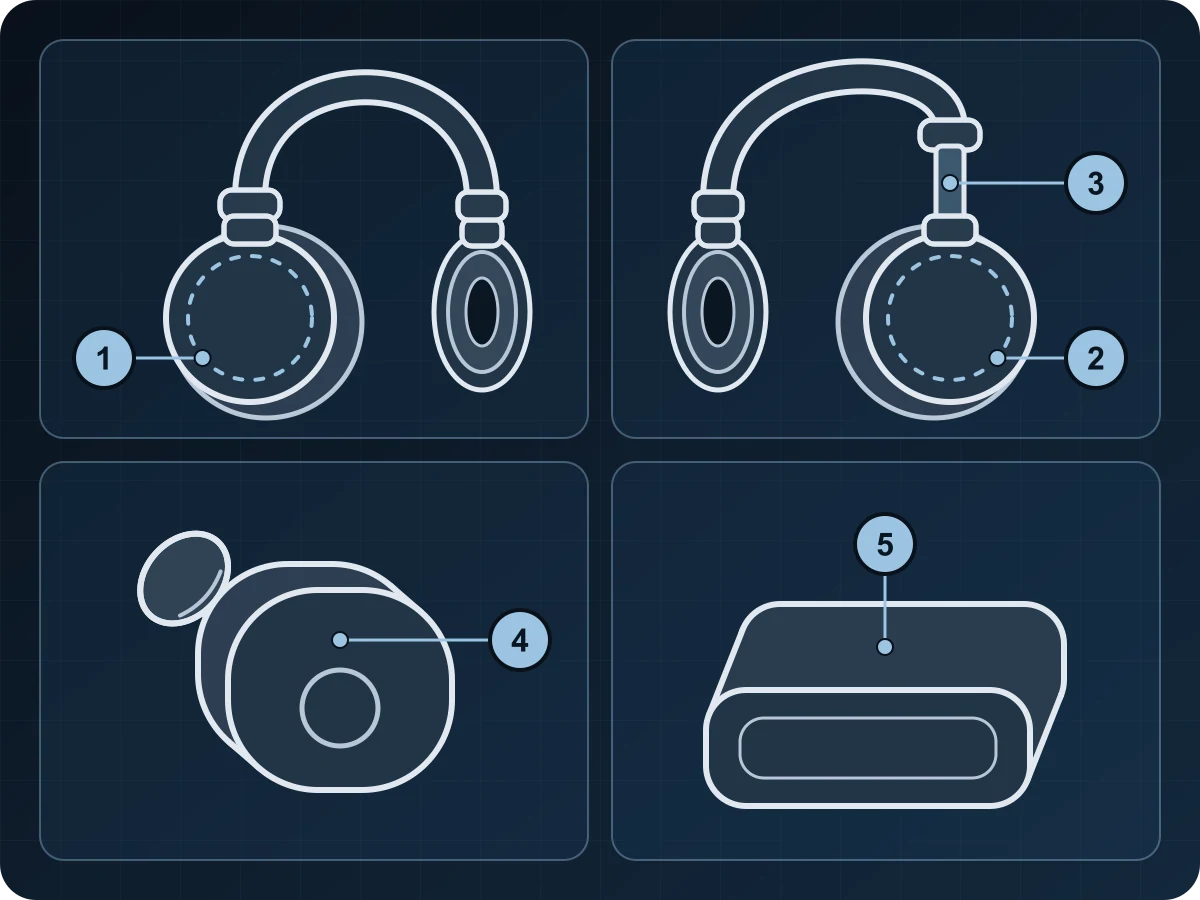
- Photograph both earcups from the outside, and the slider with the headband extended.
- Photograph each earbud's outer face, and the case open and closed.
- Photograph the charging port and every cable in the box.
- Note how each button behaves: play, pause, power and pairing.
4. Does it weigh and measure what Beats says?
This guide lists Beats' published weights and sizes for four current models, at the end of this section. Use a kitchen or postal scale, and compare only the same model. For Solo Buds, Powerbeats Fit or the Pill, check the specifications on that model's own Beats product page. Do not use figures from other sites.
Weight can be faked. Stiftung Warentest's suspected fake Solo HD from 2014 weighed less than genuine units. Electrical Safety First, a UK charity, found metal weights inside 68% of the 22 counterfeit and lookalike Apple 20W USB-C chargers it opened. Those were chargers, not headphones, but they show that a copy can be made heavier.
How much it proves: weak alone. A large gap is a question. A match proves nothing. Beats' published figures are:
- Beats Studio Pro: 260 g (9.17 oz). 17.8 cm long, 7.8 cm wide, 18.1 cm high.
- Beats Solo 4: 217 g (7.65 oz). 17.7 cm long, 15.8 cm wide, 6.8 cm high.
- Powerbeats Pro 2: Beats lists the case at 69 g, a bud at 8.7 g and a total of 77.7 g. That total equals the case plus one bud, so weigh the case and each earbud on their own, not the full set.
- Beats Studio Buds +: each earbud 5.0 g (2.05 x 1.85 x 1.5 cm), case 49.0 g (7.2 x 5.1 x 2.55 cm).
5. Pairing pop-up, Find My and firmware: what they can show
To pair with an iPhone, turn Bluetooth on, open the case with the earbuds inside or turn on the headphones, and hold them next to the iPhone. Follow the setup animation. If it does not appear, Apple says to pair by hand. Apple does not present the animation as an authenticity test. During pairing, the phone needs Wi-Fi or mobile data, or Find My features may not be available.
Sources disagree about a missing pop-up. Joe's Gaming & Electronics, a US repair and resale shop, wrote in 2018 that a missing pop-up on a Solo 3, Studio 3, Powerbeats 3 or BeatsX suggests a fake. Wicked Cushions, an ear-cushion seller, wrote in 2020 that Beats without it are most likely still authentic. A poster on the MacRumors Forums said in November 2023 that good AirPods fakes copy the animation. Treat the pop-up as a hint either way.
Chips matter here, and Beats names them for only some models: the Apple H2 chip in Powerbeats Pro 2, the H1 chip in Powerbeats Fit and the W1 chip in Beats Flex. Beats names no Apple chip for the Studio Pro or Solo 4. So pop-up tests based on W1 or H1 chips do not apply to them.
Beats lists Find My for Powerbeats Pro 2, Powerbeats Fit, Studio Pro and Solo 4. It shows the Beats' last connected location on a map. On Android, the Beats app offers Locate My Beats and needs Android 14 or later. One MacRumors Forums poster reported that Find My refused to activate fake AirPods because they were tied to another Apple ID.
Firmware updates arrive over the air on Apple devices. Settings shows the version under About, with "Latest" next to it when it is current. On Android, the Beats app shows an Update button when new firmware is available. On Apple's community forum, a buyer said in May 2025 that a Fit Pro bought from a retailer's website lacked most in-app controls. The buyer said an unnamed serial-checking website then flagged it as fake, and got a refund. This is one unverified forum report, not a verdict, and a serial website is not proof. So check in Settings or the Beats app that the controls Beats lists for your model are there. A missing control is a reason to look harder.
On Powerbeats Pro 2, the heart-rate sensors can share data with Apple Health, Apple Fitness or workout apps. Checking that this works is our suggestion, not Apple's advice. How much it proves: suggestive only. Normal setup, Find My and updates are consistent with genuine Beats. A failure is a reason to look harder.
6. Packaging, print and spelling
Apple's archived 2020 article lists packaging signs: loose or unprofessional shrink-wrap, cheap, faded or damaged packaging or labels, strange markings and misspellings. NME, reporting a BBC Radio 4 programme from about 2012, said Beats advised watching for unprofessional packaging with faded or misspelled words.
Beats does not tell you to look for a hologram. Beats' Studio Pro page, read on 3 November 2026, describes no seals or security marks on the box, and no Apple or Beats page found for this guide describes any for other models. So a seal or hologram, or the lack of one, decides nothing. Beats says the packaging is 100% fiber from sustainably managed forests.
The only lab comparison found for this guide is old. In June 2014, the German testing organisation Stiftung Warentest reported on a white Beats Solo HD (about €150) that it found during a headphone test. The unit had swapped left and right channels and a defective right side. A Beats representative who saw it said orally that it was probably counterfeit, citing the logo and colour. Beats then wrote that it could not comment. The lab calls the evidence strong, not certain, and warns that many differences only show beside a genuine unit.
How much it proves: weak to moderate without a genuine unit beside it. For reference, these are some of the more than 60 differences the lab logged on its 2014 Solo HD. Do not apply them to current boxes:
- The label on the bottom of the box was printed on, not stuck on.
- The long text on the side and back panels was white, not greyish.
- The Velcro in the brochure compartment was 3 cm wide and crooked, not 4.5 cm and straight.
- The warranty brochure was missing.
- The cable was 125.5 cm long, not 132 cm, and the plug had two rings (3-pole), not three (4-pole).
- The logo lettering was 3 mm wide, not 2 mm, and the "Solo HD" print was black, not grey.
- The hinge was looser, and the "b" on the carry bag was raised, not recessed.
7. Seller, price and paperwork
The listing is your first check. Apple's archived 2020 article lists these warning signs: a price far below what the model usually sells for, a seller offering a discount for buying more than one, and an auction listing with no box, manual or warranty paperwork. Electrical Safety First, writing about chargers, advises caution when a listing insists too strongly that a product is genuine.
Beats says genuine Beats come from Apple Retail Stores, the Apple Online Store and the Authorized Retailers it lists by region. Its list does not address third-party sellers on marketplaces. The Beats hub page names the main US and UK retailers. Even a specialist shop is no guarantee: in 2014 Stiftung Warentest bought its suspected fake at a specialist electronics chain in Berlin.
Keep the receipt. Apple may ask for the sales receipt when you seek service, even if the Beats are registered.
How much it proves: a strong risk signal before you pay. It is not proof after you buy.
Before you pay a private seller, ask for these photos. If the seller will not send them, do not buy:
- The box label near the barcode, sharp enough to read.
- The serial printed on the product: on the slider above the right earcup of a Studio Pro or Solo 4, or on the charging case of earbuds.
- A screenshot of the About screen in Settings, with the model name and serial. For earbuds, all three serials: case, left and right.
- Everything in the box, laid out, to compare with Beats' list in check 1.
- The receipt, with personal details covered, and the service paperwork if the serials do not match.
8. Sound, noise cancelling and battery: hints, not proof
A used pair can fall short of Beats' battery figures and still be genuine. Apple's warranty excludes the normal wear of batteries, unless a defect causes it.
Sound faults are a hint. Stiftung Warentest's 2014 suspect had swapped left and right channels and a defective right side, and Apple's archived article says fakes often break soon after purchase. No source found for this guide compares the noise cancelling of fake and genuine Beats.
A photo review cannot test sound, noise cancelling or battery. For a fault, Apple Store Genius Bar and Apple Authorized Service Provider technicians inspect Beats for service.
How much it proves: weak. For reference, Beats lists these battery figures:
- Beats Studio Pro: up to 40 hours with noise cancelling off, up to 24 hours with noise cancelling or Transparency on. A 10-minute Fast Fuel charge gives up to 4 hours.
- Beats Solo 4: up to 50 hours. A 10-minute Fast Fuel charge gives up to 5 hours.
- Powerbeats Pro 2: up to 45 hours with the case in Adaptive EQ mode (10 hours from the earbuds), up to 36 hours with noise cancelling or Transparency on. A 5-minute charge gives up to 1.5 hours.
- Beats Studio Buds +: up to 36 hours with the case (9 hours from the earbuds), or 24 hours with noise cancelling or Transparency on (6 hours from the earbuds).
Old tips that do not hold for current Beats
Many tips online come from models sold between 2014 and 2018. Each one below has its source and year. None should decide a case about a current model:
- No pairing pop-up means a fake. Joe's Gaming & Electronics said so in 2018, for the Solo 3, Studio 3, Powerbeats 3 and BeatsX. Wicked Cushions said the opposite in 2020, and Apple simply says to pair by hand.
- A serial on the left side means a fake. This comes from a 2021 repost on Sohu, a Chinese portal, and names no model. Apple puts the Studio Pro and Solo 4 serial on the slider above the right earcup, so check per model.
- Blue cushion foam means a fake. Joe's Gaming & Electronics said this in 2018 about the Solo 3, adding that genuine Solo 3 cushions have yellow or black foam. It also said a genuine Matte Black Solo 3 has a lighter grey headband inside, which applies to one colour of one old model.
- Chinese, Japanese and Korean text on the box. Core77 (2015) and Lyon Capitale, both describing one video of a Solo 2. Beats lists Authorized Retailers in Japan, Korea, China mainland, Hong Kong and Taiwan, so do not judge a box by its languages.
- A missing warranty card. Beats lists one for Studio Pro, Solo 4, Studio Buds + and Powerbeats Pro 2 on its US site today, but a 2016 Japanese forum answer said Beats then shipped without one in Japan.
- Only genuine Beats work with the PC Beats Updater. Wicked Cushions suggested the Updater as a second check in 2020. No Apple or Beats page checked for this guide says it detects fakes, and updates now arrive over the air on Apple devices and through the Beats app on Android.
- W1 or H1 chip tests on a Studio Pro or Solo 4. Joe's Gaming & Electronics tied its 2018 pop-up tip to the W1 chip, but Beats names no Apple chip for either current model.
- Two drivers instead of four in a Solo HD teardown. Core77 reported this in 2015, based on comments from readers and a Reddit user.
Still unsure? What to do, and what no check can prove
Keep the evidence: the listing, the messages, the receipt, and photos of the box label, the printed serial and the Settings screen.
Ask the seller for a refund first. eBay.com's Money Back Guarantee policy, read on 3 November 2026, gives you 30 calendar days from delivery to start a return, or the seller's window if it is longer. Payments made wholly or partly outside eBay are not covered. In the UK, Which? (1 September 2026) explains that Section 75 makes the credit card company jointly liable for breach of contract or misrepresentation on items over £100 and up to £30,000. Chargeback, a card-scheme rule rather than a law, covers debit cards and purchases under £100. Which? does not mention counterfeits specifically. Apple's archived 2020 article advised US buyers to report to the FBI's IC3. The Beats hub page has the full steps. This is general information, not legal advice.
For a second opinion, send photos to Vereev. The app guides you through a photo checklist. AI assists, and human experts decide. The reviewer may ask for more photos. If the photos cannot settle it, your tokens are refunded. Authentic and Replica results get an E-Result with a QR link that anyone can check. To order, search for Beats in the app. If your version of the app does not list it yet, type its full name, Beats, and continue.
Know the limit. Beats' FAQ says you can verify your Beats by registering the serial number, but the form asks only for a serial and an email, and Apple describes its coverage check as a service tool, not an authenticity test. Forum users report copied serials, mostly on AirPods. A photo review cannot test sound, battery or electrical safety.
Common questions
What readers ask about this topic
How can you tell if Beats are real or fake?
Check several things together: the model, year and box contents against Apple's and Beats' lists, the serial on the box, product and Settings, then the controls, weight, print and seller. One strong mismatch is a serious warning. No single passed check proves Beats are genuine.
Do fake Beats show the pairing pop-up on an iPhone?
Sources disagree. Joe's Gaming & Electronics, a US repair shop, said in 2018 that on W1-chip models such as the Solo 3 and Studio 3 a missing pop-up suggests a fake. Wicked Cushions, an ear-cushion seller, said in 2020 that Beats without it are most likely still authentic. A MacRumors Forums poster reports that good AirPods fakes copy the animation, and Apple says to pair by hand if the animation does not appear.
Do fake Beats work with Find My?
No Apple or Beats source says. One MacRumors Forums poster reported that Find My refused to activate fake AirPods because they were tied to another Apple ID. Treat Find My as a hint, not proof.
How much do genuine Beats Studio Pro and Solo 4 weigh?
Beats lists 260 g (9.17 oz) for the Studio Pro and 217 g (7.65 oz) for the Solo 4. Weight is one data point only, because a copy can be made heavier or lighter.
What comes in the box with genuine Powerbeats Pro 2?
On its US site, Beats lists the earbuds, eartips in five sizes from XS to XL, a wireless charging case, a Quick Start Guide and a warranty card. The power adapter and USB-C cable are sold separately, so a box that includes them does not match Beats' US list.
Do genuine Beats Studio Buds + charge wirelessly?
No. Beats says the Studio Buds + case charges by USB-C only, not wirelessly. A case sold as Studio Buds + that charges on a wireless pad does not match Beats' description.
Do genuine Beats boxes have a hologram or security seal?
Beats describes no seals or security marks on the Studio Pro box, so a hologram is not something Beats tells you to look for, and having one or not proves nothing. Apple's archived 2020 article listed loose or unprofessional shrink-wrap, faded or damaged packaging, strange markings and misspellings as warning signs.
Is a serial number on the left side a sign of fake Beats?
Not by itself. That rule comes from older models and reposts. Apple says the Studio Pro and Solo 4 print the serial on the slider above the right earcup, so check the location for your exact model.
Can you tell fake Beats by the sound?
Not reliably. A fault such as swapped left and right channels is a hint, but genuine Beats can develop faults too. A photo review cannot test sound, and no source found for this guide compares the noise cancelling of fake and genuine Beats.
How can I tell if Beats Studio Pro are fake?
Compare the box with Beats' US list: a carrying case, a USB-C to USB-C cable, a 3.5 mm cable, a Quick Start Guide and a warranty card. Then check that the serial on the slider above the right earcup matches the box and Settings, and that the sliders are metal, as Beats describes. Beats names no Apple chip for the Studio Pro, so pop-up tests based on W1 or H1 chips do not apply.
Sources and evidence
How this guide was researched
Vereev separates official brand information, established secondary references, first-party product information, and general buyer-safety guidance. Sources support context, not an authenticity verdict for an unseen item.
- Apple Support: Which Beats do I have? (read 3 Nov 2026)
Official brand source
- Apple Support: Find your Beats serial number (read 3 Nov 2026)
Official brand source
- Apple Support: Get information about your Beats
Official brand source
- Apple Support: Pair Beats
Official brand source
- Apple Support: Update Beats
Official brand source
- Apple Support: Beats app for Android, serial number and firmware
Official brand source
- Apple Support: About the warranty coverage for your Apple device (24 Jul 2025)
Official brand source
- Apple Support: Use your Beats product after service (7 Jan 2025)
Official brand source
- Apple Support: Beats, safe buying (US, 2 Oct 2020, archive copy)
Official brand source
- Apple: One (1) Year Limited Warranty, Accessory
Official brand source
- Apple: Service and Repair for Beats
Official brand source
- Beats: Studio Pro product page (US, read 3 Nov 2026)
Official brand source
- Beats: Solo 4 product page (US, read 3 Nov 2026)
Official brand source
- Beats: Powerbeats Pro 2 product page (US, read 3 Nov 2026)
Official brand source
- Beats: Studio Buds + product page (US, read 3 Nov 2026)
Official brand source
- Beats: Powerbeats Fit product page (US, read 3 Nov 2026)
Official brand source
- Beats: Flex product page (US, read 3 Nov 2026)
Official brand source
- Beats: Mobile apps (read 3 Nov 2026)
Official brand source
- Beats: FAQs (US site, read 3 Nov 2026)
Official brand source
- Beats: Official Beats Support (read 3 Nov 2026)
Official brand source
- Beats: Authorized Retailers (read 3 Nov 2026)
Official brand source
- CBP: Officers intercept more than 24,000 counterfeit headphones (US, 20 Dec 2013)
Government source
- CBP: Dulles CBP seizes counterfeit Beats headphones (US, 22 Dec 2017)
Government source
- CBP: These Beats were not so sweet (US, 3 Aug 2022)
Government source
- Stiftung Warentest: Falscher Dre? Suspected fake Beats Solo HD (Germany, 19 Jun 2014)
Established secondary source
- Electrical Safety First: Counterfeit products (UK charity)
Established secondary source
- NME: Trading Standards seizures of fake Beats, reporting BBC Radio 4 (undated, about 2012)
Established secondary source
- Core77: Beats teardown apparently used knockoffs (26 Jun 2015)
Established secondary source
- Lyon Capitale: Beats Solo 2, how to spot a counterfeit (France, undated)
Established secondary source
- Joe's Gaming & Electronics: Are your Solo 3s legit? (9 May 2018)
Retailer source
- Wicked Cushions: How to identify fake Beats headphones (3 Jun 2020)
Retailer source
- MacRumors Forums: eBay Beats Fit Pro thread (Nov 2023)
Reseller report
- Apple Community: Beats Fit Pro authenticity thread (forum, May 2025)
Reseller report
- Apple Community: Studio3 Wireless serial mismatch thread (forum, Aug 2022)
Reseller report
- Yahoo! Chiebukuro, a Japanese Q&A forum: Beats warranty answer (12 Jun 2016)
Reseller report
- Sohu: repost on Beats serial location (China, 2021)
Reseller report
- eBay: Money Back Guarantee policy (eBay.com, read 3 Nov 2026)
Retailer source
- Which?: Can I claim on my credit card when something goes wrong? (UK, 1 Sep 2026)
Established secondary source
Read the full Vereev research methodology or request a correction.
Continue your research
Brand guide
Beats Authentication
Read the full guideSample photos
How to Photograph Electronics for Authentication
See the sample photosElectronics authentication
Beats Serial Number Check: Where to Find It and What It Proves
Read guideLuxury resale verification
How to Authenticate an Item Before Buying It
Read guideOnline authentication
What Photos Are Needed for Online Authentication?
Read guideItem-level review
Authenticate with Vereev
Use the guide to collect clear evidence, then submit the exact item through Vereev when you need an authentication result and digital certificate.
Vereev is an independent authentication service and is not affiliated with, endorsed by, or sponsored by Beats. Educational guidance cannot replace an item-level review.